CHARACTER TREE
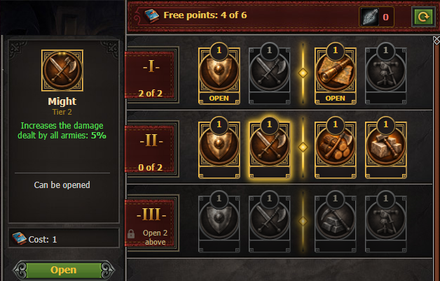
Your commander grows stronger with every avatar level! The new
Character Tree lets you turn your experience into permanent bonuses for your kingdom and your armies. Open it with the
Tree button in the Equipment window.
HOW IT WORKS
1. Every avatar level you reach gives you 1 point of the Character Tree.
2. The tree is made of rows. Each node of a row costs points - the cost is shown on the node.
3. In every row you can open 2 nodes. A row is split into two blocks, and you choose one node from each block.
4. The next row becomes available once 2 nodes of the row above are open.
5. An opened node starts working at once and stays open until you reset the tree.
A TREE FOR EVERY SPECIALITY
Warriors, Archers, Healers and Alchemists each have their own tree of 8 rows with bonuses that suit their way of play. A commander without a speciality uses the common tree.
Among the bonuses you will find:
- attack and defence of all armies;
- scouting, troop training speed and resource production;
- Leadership, which raises the morale of your armies in battle;
- mastery of a weapon - swords, axes, spears, bows, crossbows, billhooks and firearms;
- command of a troop kind - infantry, cavalry, archers, horse archers, siege machines and gunpowder troops;
- bonuses for festive and rare troops, and for single units.
RESET THE TREE

Want to choose a different path? The
Reset button closes all nodes and returns every spent point. A reset costs one
Elixir of Oblivion; how many you have is shown next to the button.
Changing your speciality also resets the Character Tree and takes an Elixir of Oblivion in addition to the usual price of the change.
TRANSFER ALL BUILDINGS
Moving your kingdom around just got much easier! A new option in the
Landscape tab lets you transfer all buildings out of a location in one go, instead of moving them one by one.
HOW IT WORKS
Open the Landscape tab in the location you want to empty. Right below the terrain change section you will find the new
Move all buildings section with the
Transfer button.
The game takes every transferable building of this location, one after another, and looks for a free place for it in your other locations of a proper type - your cities, resource locations and bonus locations.
THE USUAL RULES APPLY
1. Each building is moved exactly as if you moved it by hand: building limits, terrain, free population and enemy troops are all checked.
2. Each transfer costs the usual transfer price in gold.
3. The castle and the main building of a location are never moved.
4. Buildings that are being built or upgraded stay where they are.
5. If you run out of gold, the transfer stops.
BEFORE YOU CONFIRM
After pressing
Transfer, a confirmation window shows how many buildings will be transferred and the maximum amount of gold needed. Please note that the buildings will be moved to other locations and the action cannot be undone automatically.
Transferring buildings may take some time - please wait until the process is fully finished. When it is done, you will see how many buildings were moved, how many could not find a place, and how much gold was spent.
DISCARD WITH COMPENSATION
[img]https://hope.1100ad.com/images/location/icon/bounty_house.gif]
Do you have a city you no longer need? Now it can be discarded with compensation, so the effort you put into it is not lost.
In the city's discard window, choose
Discard with compensation. The city's points - mercenary, population, naval, technical and gunpowder points from its buildings and from the artifacts used on it - are moved into a new building, the
Bounty House, in your clan castle. The city itself is removed from the map for good.
1. The Bounty House is built automatically the first time you discard with compensation; there is always one Bounty House, and every further compensation adds its points to it.
2. You need a clan castle with a free place for the Bounty House.
3. Only ordinary player cities can be discarded with compensation, and the city must have been in your possession for some time.
4. The number of compensations is limited per month - the discard window shows when the next one is available.
5. The best Bounty Houses can be seen in the new
Best Bounty House ranking.
UPGRADE AS FAR AS RESOURCES ALLOW

A new button with a
blue arrow has appeared in the
Info tab of unique buildings, next to the "upgrade to max" button. It is available to players with a
VIP subscription.
1. If you have enough resources for the whole way up to the maximum level, only the usual "upgrade to max" button is shown.
2. If you do not have enough for all levels, the blue button upgrades the building at once by as many levels as your resources allow. All these levels are paid up front and built in the time of a single level.
3. If you do not have enough even for one level, the "upgrade to max" button stays inactive, as before.
4. Hover over the button to see how many levels it will build and what it will cost.
ADDITIONAL CHANGES


New
Master Combatant I, II and III equipment sets have been added for Warriors, Archers, Healers and Alchemists. The sets are meant for avatar levels 72, 73 and 74 and can be found in adventure locations.

